
The “Bluetooth” menu is available from the “Other” menu.
Currently, Bluetooth-compatible heart rate monitors, radars (Garmin Varia / Bryton), power meters, cadence, and speed sensors are supported.
For Garmin watch users, there is a trick to retrieve heart rate data from the watch. See the tutorial here.
Start by ensuring that Bluetooth is enabled on your smartphone.
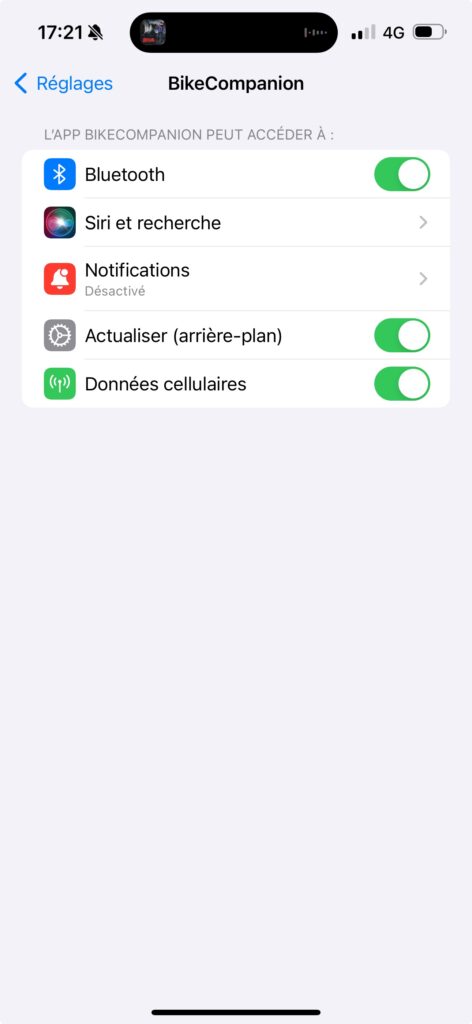
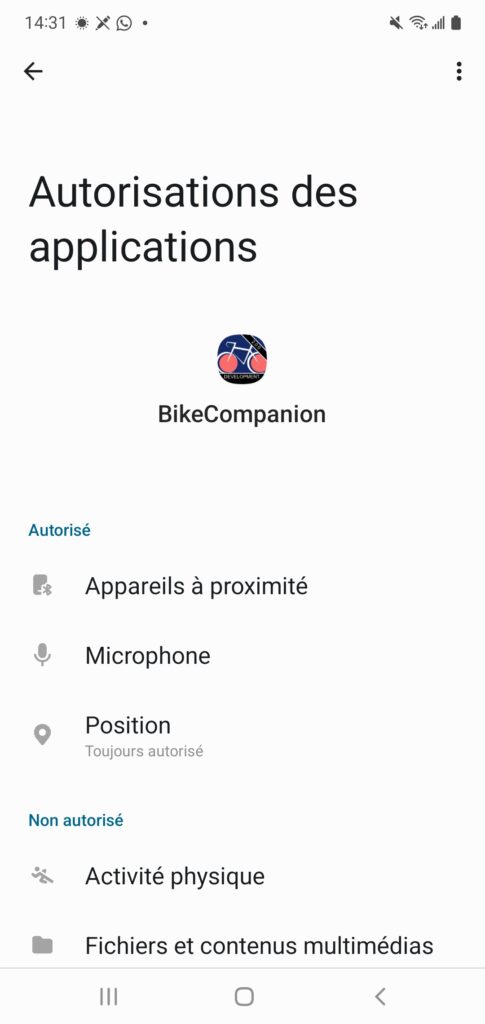
Next, check that you have granted the BikeCompanion app permission to use Bluetooth.
On iOS, go to “Settings” and look for the “BikeCompanion” app.
On Android, in “Settings,” search for the “BikeCompanion” app:
Then ensure that “Nearby Devices” is set to “Allowed.”
If you’re unable to pair your sensor, check that the sensor is not already paired with another device.
For example, if you have a Polar watch, an H10 heart rate strap, and your smartphone, open the app and pair with the strap before starting an activity on the watch; otherwise, the watch will connect to the strap instead.
If you have a radar, it should not be paired with the Garmin Varia / Bryton app (or any other app).
As a last resort, you can close the app and try again.


